Salta al contenuto principale
Unisciti alla Community delle riparazioni - Crea un account

Meta Quest 3 Controller Strap Replacement

Cosa ti serve

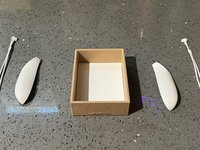
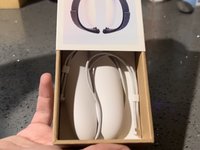
  1. Meta Quest 3 Controller Strap Replacement, Controller straps: passo 1, immagine 1 di 1
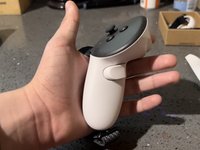
    • First, you will want to pick up any of the controllers to begin replacing the wrist strap.

    Chiedi a FixBot

    Aggiungi Commento

  2. Meta Quest 3 Controller Strap Replacement: passo 2, immagine 1 di 1
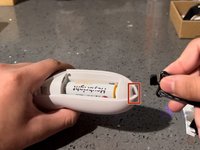
    • Adjacent to the controller's joystick is a white triangle button.

    • You need to press down firmly on the button to open the controller's battery compartment.

    Chiedi a FixBot

    Aggiungi Commento

  3. Meta Quest 3 Controller Strap Replacement: passo 3, immagine 1 di 2 Meta Quest 3 Controller Strap Replacement: passo 3, immagine 2 di 2
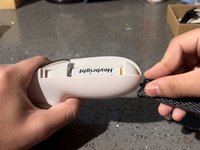
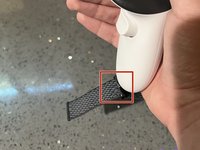
    • Once you open the compartment, pinch and pull up the strap to disconnect it from the controller.

    Chiedi a FixBot

    Aggiungi Commento

  4. Meta Quest 3 Controller Strap Replacement: passo 4, immagine 1 di 1
    • Grab the corresponding wrist strap for the controller you are working on.

    Chiedi a FixBot

    Aggiungi Commento

  5. Meta Quest 3 Controller Strap Replacement: passo 5, immagine 1 di 2 Meta Quest 3 Controller Strap Replacement: passo 5, immagine 2 di 2
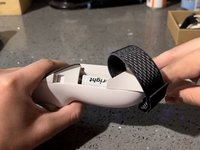
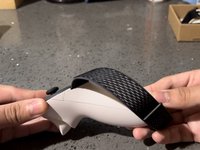
    • With the new wrist strap, push the black clip down into the now-empty small compartment to connect your new strap to the controller.

    Chiedi a FixBot

    Aggiungi Commento

  6. Meta Quest 3 Controller Strap Replacement: passo 6, immagine 1 di 2 Meta Quest 3 Controller Strap Replacement: passo 6, immagine 2 di 2
    • You can close the battery compartment using the new cover connected to the controller strap.

    • Closing the battery compartment can be frustrating because it is connected to the strap; I found it easier to slide the cover from the bottom to the top.

    • The new controller straps come with new battery compartment covers, so when you replace the straps, you will end up with spare parts.

    Chiedi a FixBot

    Aggiungi Commento

  7. Meta Quest 3 Controller Strap Replacement: passo 7, immagine 1 di 3 Meta Quest 3 Controller Strap Replacement: passo 7, immagine 2 di 3 Meta Quest 3 Controller Strap Replacement: passo 7, immagine 3 di 3
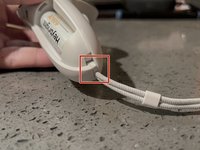
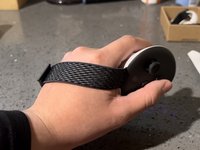
    • Put the controller in your hands to see if you need to adjust the fit of the strap.

    • If Adjustments are needed, you can pull or push the strap through the clip's hole.

    Chiedi a FixBot

    Aggiungi Commento

  8. Meta Quest 3 Controller Strap Replacement: passo 8, immagine 1 di 2 Meta Quest 3 Controller Strap Replacement: passo 8, immagine 2 di 2
    • Next, repeat steps 2-7 on the second controller.

    • As mentioned in step 6, you will have spare parts left over from the original wrist strap and battery cover. Store these parts somewhere safe if you ever feel like reverting to the original controller straps.

    Chiedi a FixBot

    Aggiungi Commento

Conclusione

Once you have followed all these steps, you will have properly applied the accessory to your oculus quest 3 controllers.

Annulla: non ho completato questa guida.

Altre 2 persone hanno completato questa guida.

Andrew28709

Membro da: 10/18/23

184 Reputazione

Una guida realizzata

Team

CSU Los Angeles, Team 3-17, Briggs Fall 2023 Membro di CSU Los Angeles, Team 3-17, Briggs Fall 2023

CSULA-BRIGGS-F23S3G17

Membro di 1

1 guide realizzate

1Commento della guida

how do o fix my controller

Zzopekvr VR - Rispondi Condividi

Aggiungi Commento

Visualizza statistiche:

Ultime 24 ore: 8

Ultimi 7 giorni: 75

Ultimi 30 giorni: 313

Tutti i Tempi: 8,368