Salta al contenuto principale
Unisciti alla Community delle riparazioni - Crea un account

Maze Speed SSB-508 Speaker and Microphone Replacement

Cosa ti serve

  1. Maze Speed SSB-508 Speaker and Microphone Replacement, Speaker and Microphone: passo 1, immagine 1 di 3 Maze Speed SSB-508 Speaker and Microphone Replacement, Speaker and Microphone: passo 1, immagine 2 di 3 Maze Speed SSB-508 Speaker and Microphone Replacement, Speaker and Microphone: passo 1, immagine 3 di 3
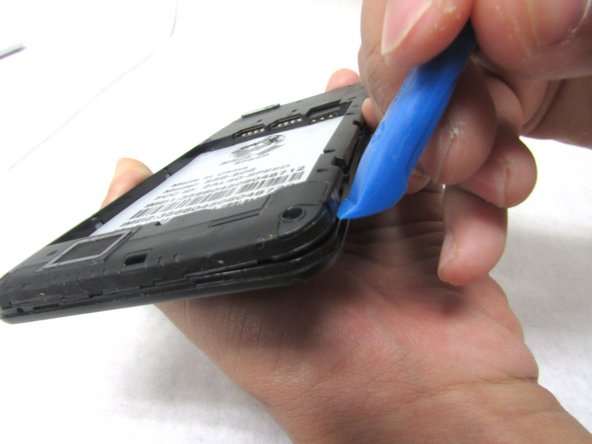
    • With the phone face down, remove the back cover with the plastic opening tool. For easiest access, insert the plastic opening tool in the bottom left corner.

    Chiedi a FixBot

    Aggiungi Commento

  2. Maze Speed SSB-508 Speaker and Microphone Replacement: passo 2, immagine 1 di 1
    • After the back cover is removed, remove the battery, sim cards, and micro SD card. These components are highlighted in red.

    Chiedi a FixBot

    Aggiungi Commento

  3. Maze Speed SSB-508 Speaker and Microphone Replacement: passo 3, immagine 1 di 3 Maze Speed SSB-508 Speaker and Microphone Replacement: passo 3, immagine 2 di 3 Maze Speed SSB-508 Speaker and Microphone Replacement: passo 3, immagine 3 di 3
    • Using the screwdriver, remove fourteen 2mm screws to access the internal casing of the phone.

    • After the screws are removed, use the plastic opening tool to remove the internal casing cover.

    Chiedi a FixBot

    Aggiungi Commento

  4. Maze Speed SSB-508 Speaker and Microphone Replacement: passo 4, immagine 1 di 2 Maze Speed SSB-508 Speaker and Microphone Replacement: passo 4, immagine 2 di 2
    Strumento utilizzato in questo passaggio:
    Tweezers
    $4.99
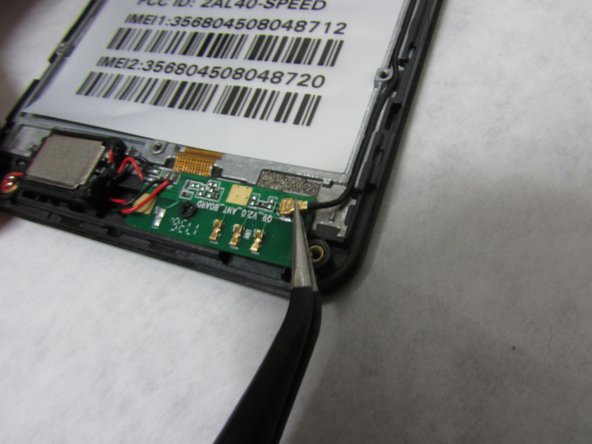
    • Locate the wire that attaches the motherboard to the daughter-board of the speaker and mic. Using tweezers, disconnect the wire from the motherboard.

    Chiedi a FixBot

    Aggiungi Commento

  5. Maze Speed SSB-508 Speaker and Microphone Replacement: passo 5, immagine 1 di 3 Maze Speed SSB-508 Speaker and Microphone Replacement: passo 5, immagine 2 di 3 Maze Speed SSB-508 Speaker and Microphone Replacement: passo 5, immagine 3 di 3
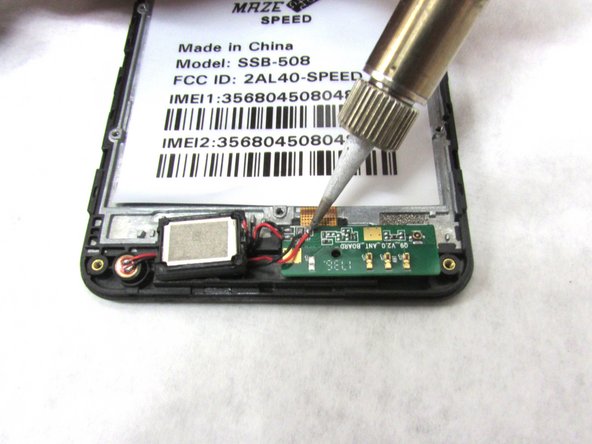
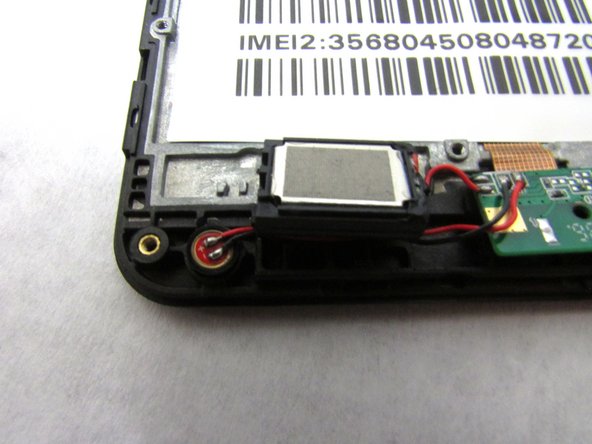
    • Using your soldering tools, un-solder both set of wires that are connected to the daughter-board.

    • You may now replace the old speaker and mic with new accessories.

    Chiedi a FixBot

    Aggiungi Commento

Conclusione

To reassemble your device, follow these instructions in reverse order.

Annulla: non ho completato questa guida.

Altre 2 persone hanno completato questa guida.

0Commenti sulla guida

Aggiungi Commento

Visualizza statistiche:

Ultime 24 ore: 1

Ultimi 7 giorni: 4

Ultimi 30 giorni: 27

Tutti i Tempi: 1,092