Salta al contenuto principale
Unisciti alla Community delle riparazioni - Crea un account

MacBook Pro 17" Unibody Bluetooth Board Replacement

Cosa ti serve

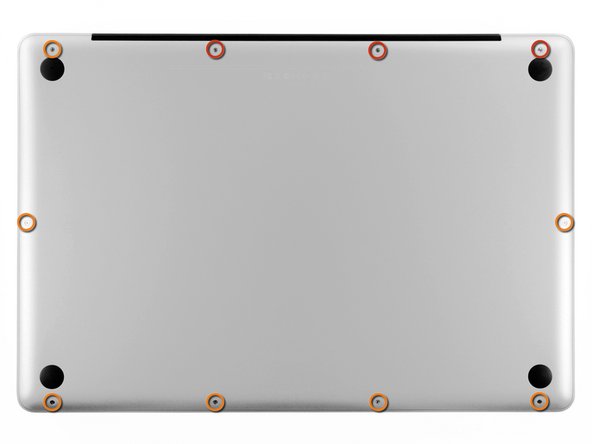
  1. MacBook Pro 17" Unibody Bluetooth Board Replacement, Lower Case: passo 1, immagine 1 di 1
    • Remove the following ten screws securing the lower case to the upper case:

    • Three 13.5 mm Phillips screws.

    • Seven 3 mm Phillips screws.

    Chiedi a FixBot

    Aggiungi Commento

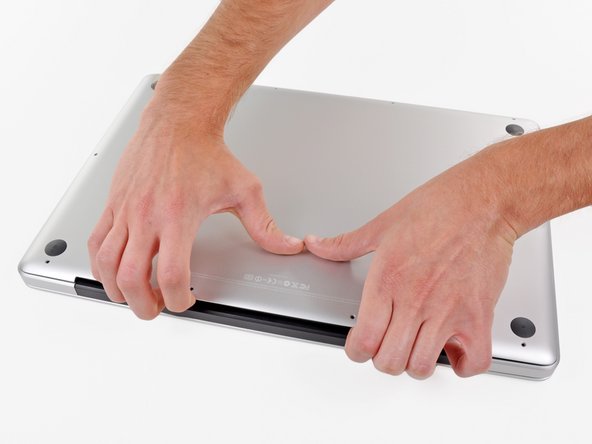
  2. MacBook Pro 17" Unibody Bluetooth Board Replacement: passo 2, immagine 1 di 2 MacBook Pro 17" Unibody Bluetooth Board Replacement: passo 2, immagine 2 di 2
    • Wedge your fingers between the lower case and the vent, and lift upward to release the two clips holding the lower case to the upper case.

    • During reassembly, carefully align the lower case and then press it firmly until both clips engage.

    • Remove the lower case.

    Chiedi a FixBot

    Aggiungi Commento

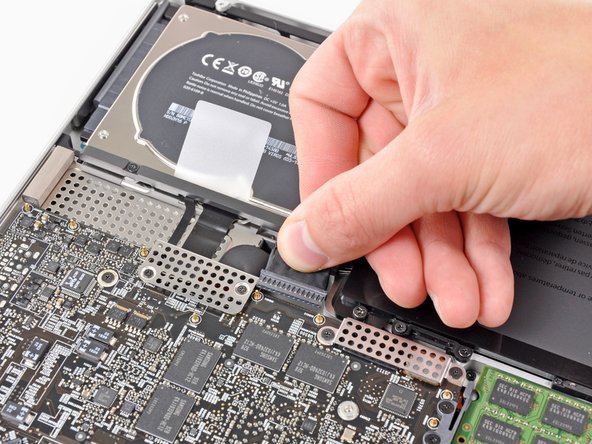
  3. MacBook Pro 17" Unibody Bluetooth Board Replacement, Battery: passo 3, immagine 1 di 3 MacBook Pro 17" Unibody Bluetooth Board Replacement, Battery: passo 3, immagine 2 di 3 MacBook Pro 17" Unibody Bluetooth Board Replacement, Battery: passo 3, immagine 3 di 3
    • Whenever working near the logic board, it is always wise to first disconnect the battery to avoid short circuits.

    • If present, grab the plastic tab attached to the battery connector and pull it toward the front edge of the device. For Late-2011 models the battery connector will not have a tab and is simply a plug that inserts straight down into the motherboard--to remove pry the plug straight up.

    • If the plastic tab is missing, use a spudger to pry the connector up from its socket.

    • Pull the tab parallel to the face of the logic board.

    Chiedi a FixBot

    Aggiungi Commento

  4. MacBook Pro 17" Unibody Bluetooth Board Replacement, Bluetooth Board: passo 4, immagine 1 di 1
    • Carefully pull the Bluetooth cable toward the fans to disconnect it from the Bluetooth board.

    • Pull the cable parallel to the face of the optical drive.

    Chiedi a FixBot

    Aggiungi Commento

  5. MacBook Pro 17" Unibody Bluetooth Board Replacement: passo 5, immagine 1 di 1
    • Use the flat end of a spudger to peel the thin plastic cover off the top and sides of the Bluetooth board housing.

    Chiedi a FixBot

    Aggiungi Commento

  6. MacBook Pro 17" Unibody Bluetooth Board Replacement: passo 6, immagine 1 di 1
    • Use the flat end of a spudger to pry the Bluetooth antenna connector up and off its socket on the Bluetooth board.

    Chiedi a FixBot

    Aggiungi Commento

  7. MacBook Pro 17" Unibody Bluetooth Board Replacement: passo 7, immagine 1 di 1
    • Remove the two 2.2 mm Phillips screws securing the Bluetooth housing to the side of the optical drive.

    Chiedi a FixBot

    Aggiungi Commento

  8. MacBook Pro 17" Unibody Bluetooth Board Replacement: passo 8, immagine 1 di 1
    • De-route the camera cable from its slot in the Bluetooth housing and remove the Bluetooth board from the upper case.

    Chiedi a FixBot

    Aggiungi Commento

Conclusione

To reassemble your device, follow these instructions in reverse order.

Annulla: non ho completato questa guida.

Altre 6 persone hanno completato questa guida.

1Commento della guida

I have a late 20 17” MacBook Pro A1297 abd from step 4 on, the photos do not look like the interior of my Mac.

jkorchok - Rispondi Condividi

Aggiungi Commento

Visualizza statistiche:

Ultime 24 ore: 0

Ultimi 7 giorni: 19

Ultimi 30 giorni: 96

Tutti i Tempi: 24,625