Salta al contenuto principale

MSI GE70 2PE Apache Pro Battery Replacement

Cosa ti serve

  1. MSI GE70 2PE Apache Pro Battery Replacement, Battery: passo 1, immagine 1 di 1
    • Turn over the laptop so the battery compartment is facing up.

  2. MSI GE70 2PE Apache Pro Battery Replacement: passo 2, immagine 1 di 1
    • Push the right latch all the way to the right until it clicks into place.

  3. MSI GE70 2PE Apache Pro Battery Replacement: passo 3, immagine 1 di 1
    • Pull and hold the left latch.

  4. MSI GE70 2PE Apache Pro Battery Replacement: passo 4, immagine 1 di 1
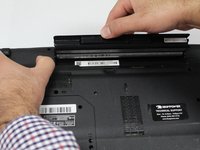
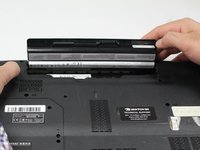
    • Pry the battery upward using the indent.

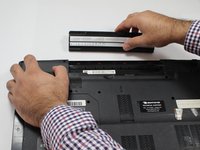
  5. MSI GE70 2PE Apache Pro Battery Replacement: passo 5, immagine 1 di 3 MSI GE70 2PE Apache Pro Battery Replacement: passo 5, immagine 2 di 3 MSI GE70 2PE Apache Pro Battery Replacement: passo 5, immagine 3 di 3
    • Continue to pull the battery until it is free of the casing.

Conclusione

To reassemble your device, follow these instructions in reverse order.

Un'altra persona ha completato questa guida.

0Commenti sulla guida

Aggiungi Commento

Visualizza Statistiche:

Ultime 24 Ore: 2

Ultimi 7 Giorni: 10

Ultimi 30 Giorni: 29

Tutti i Tempi: 2,085