Salta al contenuto principale

Logitech Wireless K360 Kickstand Replacement

  1. Logitech Wireless K360 Kickstand Replacement, Kickstand: passo 1, immagine 1 di 1
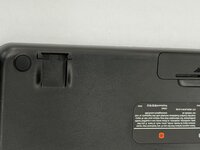
    • Turn the keyboard around so it's facing down.

  2. Logitech Wireless K360 Kickstand Replacement: passo 2, immagine 1 di 2 Logitech Wireless K360 Kickstand Replacement: passo 2, immagine 2 di 2
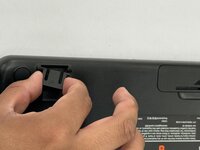
    • Use your fingers to grasp the kickstand.

  3. Logitech Wireless K360 Kickstand Replacement: passo 3, immagine 1 di 3 Logitech Wireless K360 Kickstand Replacement: passo 3, immagine 2 di 3 Logitech Wireless K360 Kickstand Replacement: passo 3, immagine 3 di 3
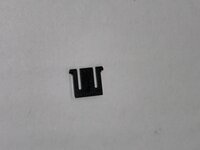
    • Pinch the kickstand and slide it out of the keyboard.

Conclusione

To reassemble your device, follow these instructions in reverse order.

Alan Hernandez

Membro da: 02/25/25

193 Reputazione

2 Guide realizzate

Team

0Commenti sulla guida

Aggiungi Commento

Visualizza Statistiche:

Ultime 24 Ore: 0

Ultimi 7 Giorni: 0

Ultimi 30 Giorni: 6

Tutti i Tempi: 71