Salta al contenuto principale

Logitech G400s Mouse Cable Replacement

Cosa ti serve

  1. Logitech G400s Mouse Cable Replacement, Mouse Cable: passo 1, immagine 1 di 1
    • Use a Jimmy to remove the mouse feet.

    • Be careful to remove any film left by the mouse feet as well.

  2. Logitech G400s Mouse Cable Replacement: passo 2, immagine 1 di 1
    • Remove the bottom mouse foot using a Jimmy and the same technique as in Step 1.

  3. Logitech G400s Mouse Cable Replacement: passo 3, immagine 1 di 1
    • Use a Phillips #1 screwdriver to remove the three 5 mm Philips screws on the bottom surface.

  4. Logitech G400s Mouse Cable Replacement: passo 4, immagine 1 di 1
    • Gently pull the upper shell away from the bottom platform.

  5. Logitech G400s Mouse Cable Replacement: passo 5, immagine 1 di 1
    • This is what the G400s will look like when the top shell is taken off.

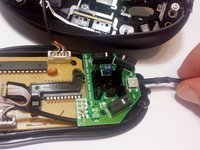
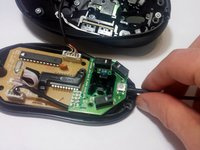
  6. Logitech G400s Mouse Cable Replacement: passo 6, immagine 1 di 2 Logitech G400s Mouse Cable Replacement: passo 6, immagine 2 di 2
    • Push the cable into its proper place inside the mouse shell.

Conclusione

To reassemble your device, follow these instructions in reverse order.

Un'altra persona ha completato questa guida.

Max Evans

Membro da: 09/28/16

433 Reputazione

3 Guide realizzate

Team

USF Tampa, Team 16-7, Eyestone Fall 2016 Membro di USF Tampa, Team 16-7, Eyestone Fall 2016

USFT-EYESTONE-F16S16G7

1 Membro

9 Guide realizzate

0Commenti sulla guida

Aggiungi Commento

Visualizza Statistiche:

Ultime 24 Ore: 1

Ultimi 7 Giorni: 11

Ultimi 30 Giorni: 40

Tutti i Tempi: 4,814