Salta al contenuto principale
Unisciti alla Community delle riparazioni - Crea un account

Kindle 10 Battery Replacement

Cosa ti serve

  1. Kindle 10 Battery Replacement, Battery: passo 1, immagine 1 di 2 Kindle 10 Battery Replacement, Battery: passo 1, immagine 2 di 2
    • Gently use a metal spudger to pry, twist, and lift the bezel away from the display.

  2. Kindle 10 Battery Replacement: passo 2, immagine 1 di 1
    • Remove the eight 2.6 mm screws using a T5 Torx screwdriver.

  3. Kindle 10 Battery Replacement: passo 3, immagine 1 di 2 Kindle 10 Battery Replacement: passo 3, immagine 2 di 2
    • Use the metal spudger to gently lift the screen out of the back frame.

  4. Kindle 10 Battery Replacement: passo 4, immagine 1 di 1
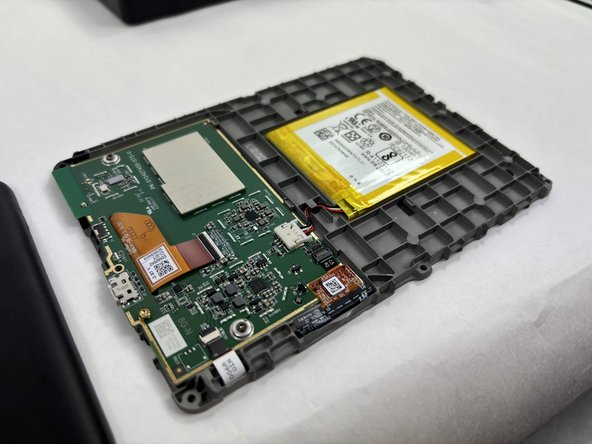
    • Detach the battery connector from the motherboard.

    • The battery pack may be glued on to the gray plastic frame. Take care when prying it out not to rip the battery, since it is made of a lithium polymer which is flammable and deforms easily.

Conclusione

To reassemble your device, follow these instructions in reverse order.

Un'altra persona ha completato questa guida.

hzheng2

Membro da: 10/21/24

537 Reputazione

4 Guide realizzate

Team

UMass Dartmouth, Team 1-2, Konn Fall 2024 Membro di UMass Dartmouth, Team 1-2, Konn Fall 2024

UMASSD-KONN-F24S1G2

3 Membri

6 Guide realizzate

1Commento della guida

Do you have any replacements if we break the case ?

Calixte Marbach - Replica Condividi

Aggiungi Commento

Visualizza Statistiche:

Ultime 24 Ore: 10

Ultimi 7 Giorni: 60

Ultimi 30 Giorni: 280

Tutti i Tempi: 2,989