Salta al contenuto principale

JBL Pulse 3 LED Light Display Replacement

Cosa ti serve

  1. JBL Pulse 3 LED Light Display Replacement, Speaker Grill: passo 1, immagine 1 di 1
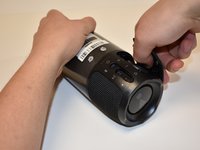
    • Lay the JBL Pulse 3 on its side as shown in the picture.

    • Use a plastic opening tool to lift the top right corner of the speaker grill. A small amount of force is necessary to remove the grill.

  2. JBL Pulse 3 LED Light Display Replacement: passo 2, immagine 1 di 1
    • Repeat step 1 for bottom right corner of speaker grill.

  3. JBL Pulse 3 LED Light Display Replacement: passo 3, immagine 1 di 2 JBL Pulse 3 LED Light Display Replacement: passo 3, immagine 2 di 2
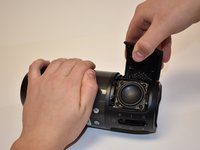
    • After pulling the right side of the grill off, place thumb underneath grill as shown in the picture.

    • Lift and pull straight out to pull grill off the posts.

    • Repeat steps 1-3 for the left side of the speaker grill on the JBL Pulse 3. The speaker grill should now be completely removed from the JBL Pulse 3.

  4. JBL Pulse 3 LED Light Display Replacement, Outside Casing: passo 5, immagine 1 di 2 JBL Pulse 3 LED Light Display Replacement, Outside Casing: passo 5, immagine 2 di 2
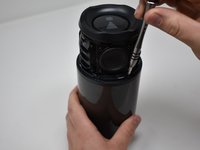
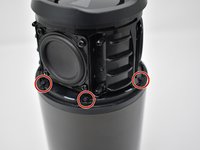
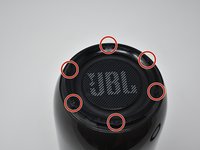
    • Use a Phillips #00 screwdriver to remove the six black 6mm screws on the inside of the top of the bottom section.

  5. JBL Pulse 3 LED Light Display Replacement: passo 6, immagine 1 di 2 JBL Pulse 3 LED Light Display Replacement: passo 6, immagine 2 di 2
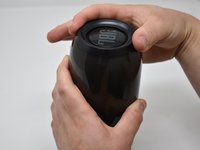
    • Turn the JBL Pulse 3 right-side up and unscrew the top ring of the device. A small amount of force and/or a cotton cloth may be necessary to remove this piece.

  6. JBL Pulse 3 LED Light Display Replacement: passo 7, immagine 1 di 2 JBL Pulse 3 LED Light Display Replacement: passo 7, immagine 2 di 2
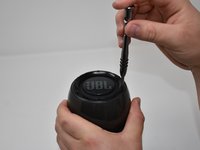
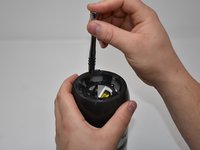
    • Remove the six 5mm screws on top of the JBL Pulse 3 with a Phillips #0 screwdriver.

  7. JBL Pulse 3 LED Light Display Replacement: passo 8, immagine 1 di 1
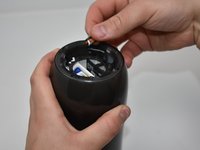
    • Pull off the top disc of the JBL Pulse 3.

  8. JBL Pulse 3 LED Light Display Replacement: passo 9, immagine 1 di 2 JBL Pulse 3 LED Light Display Replacement: passo 9, immagine 2 di 2
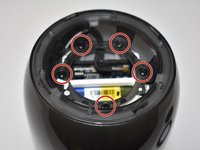
    • Remove the five 7mm screws on the inside of the JBL Pulse 3 with a Phillips #1 screwdriver.

  9. JBL Pulse 3 LED Light Display Replacement: passo 10, immagine 1 di 2 JBL Pulse 3 LED Light Display Replacement: passo 10, immagine 2 di 2
    • Peel off black, taped-on electrical lead from the inside side of the JBL Pulse 3.

  10. JBL Pulse 3 LED Light Display Replacement: passo 11, immagine 1 di 1
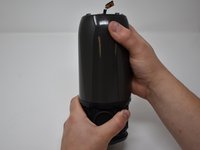
    • Pull the top section of the JBL Pulse 3 up. The outside casing to the JBL Pulse 3 should now be removed.

  11. JBL Pulse 3 LED Light Display Replacement, LED Light Display: passo 12, immagine 1 di 3 JBL Pulse 3 LED Light Display Replacement, LED Light Display: passo 12, immagine 2 di 3 JBL Pulse 3 LED Light Display Replacement, LED Light Display: passo 12, immagine 3 di 3
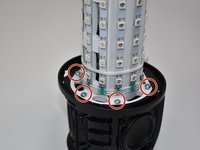
    • Use a Phillips #2 screwdriver to remove the six 11 mm screws that circle the bottom of the LED light display.

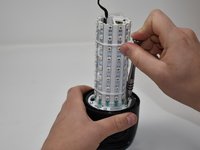
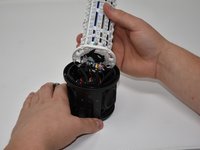
    • Pull the LED light display off of the JBL Pulse 3 base.

  12. JBL Pulse 3 LED Light Display Replacement: passo 13, immagine 1 di 2 JBL Pulse 3 LED Light Display Replacement: passo 13, immagine 2 di 2
    Attrezzo utilizzato in questo passaggio:
    Tweezers
    $4.99
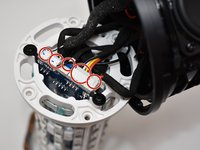
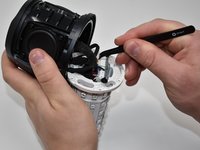
    • Use tweezers to pull the five connections off of the LED light display.

Conclusione

To reassemble your device, follow these instructions in reverse order.

Altre 3 persone hanno completato questa guida.

4Commenti sulla guida

Hello,I really need some code to show me how to initialize and LED display and how to output data from it.Any help is much appreciated.

Osama Siddiq - Replica
Wow jbl

Gyyzhuahyz8yus

Majd Tom - Replica
Where to buy the leds?

mj.viana1993 - Replica

Hello i need an assitance in a LED screen manufacturing

volkanoo - Replica

Aggiungi Commento

Visualizza Statistiche:

Ultime 24 Ore: 3

Ultimi 7 Giorni: 12

Ultimi 30 Giorni: 76

Tutti i Tempi: 3,772