Salta al contenuto principale

JBL Clip 3 Button Board Replacement

Cosa ti serve

  1. JBL Clip 3 Button Board Replacement, Button Board: passo 1, immagine 1 di 2 JBL Clip 3 Button Board Replacement, Button Board: passo 1, immagine 2 di 2
    • Insert an opening tool between the speaker grille and speaker housing and pry around the entire perimeter of the device until the grille is released.

    • A strong adhesive attaches the grill to the housing and requires some time and patience to break. Use mild heat to loosen the adhesive if necessary.

  2. JBL Clip 3 Button Board Replacement: passo 2, immagine 1 di 2 JBL Clip 3 Button Board Replacement: passo 2, immagine 2 di 2
    • Use a Phillips #1 screwdriver to remove the five 6.3 mm screws around the perimeter.

  3. JBL Clip 3 Button Board Replacement: passo 3, immagine 1 di 1
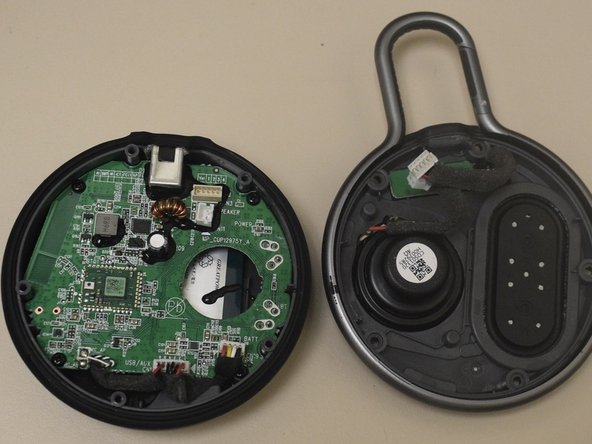
    • Separate the speaker housing from the rest of the body.

    • Carefully lift the speaker housing since there are components that are connected to the speaker housing.

    • The speaker housing and the body are not glued together.

  4. JBL Clip 3 Button Board Replacement: passo 4, immagine 1 di 2 JBL Clip 3 Button Board Replacement: passo 4, immagine 2 di 2
    • Carefully remove the 2-pin and 4-pin connectors from the motherboard.

    • Tweezers can also be used to remove the 2-pin and 4-pin connectors.

  5. JBL Clip 3 Button Board Replacement: passo 5, immagine 1 di 3 JBL Clip 3 Button Board Replacement: passo 5, immagine 2 di 3 JBL Clip 3 Button Board Replacement: passo 5, immagine 3 di 3
    • Use a Phillips #2 screwdriver to remove the two 6.3 mm screws.

    • Carefully remove the internal speaker from the speaker housing.

    • This step is completely optional; completing this step will help unclutter the speaker housing, allowing you to unscrew the last final screws easier.

  6. JBL Clip 3 Button Board Replacement: passo 6, immagine 1 di 3 JBL Clip 3 Button Board Replacement: passo 6, immagine 2 di 3 JBL Clip 3 Button Board Replacement: passo 6, immagine 3 di 3
    • Use a Phillips #2 screwdriver to remove the two 6.3 mm screws from the button board.

    • Carefully lift and remove the button board from the speaker housing.

    • When reassembling your device, remember to use super glue to reattach the grille to the speaker housing.

Conclusione

To reassemble your device, follow these instructions in reverse order.

Un'altra persona ha completato questa guida.

Adrian Mayorga

Membro da: 10/21/24

133 Reputazione

1 Guida realizzata

Team

0Commenti sulla guida

Aggiungi Commento

Visualizza Statistiche:

Ultime 24 Ore: 0

Ultimi 7 Giorni: 7

Ultimi 30 Giorni: 25

Tutti i Tempi: 311