Salta al contenuto principale
Unisciti alla Community delle riparazioni - Crea un account

Huawei P10 Vibration Motor Replacement

Visualizzazioni: 1601

Visualizza statistiche:

Ultime 24 ore:
4
Ultimi 7 giorni:
16
Ultimi 30 giorni:
68
Tutti i Tempi:
1.601
Commenti: 15

15 commenti sui passaggi.

Completato: 0

Nessuno ha contrassegnato questa guida "completata". Sarai il primo?

Preferiti: 0

Nessuno ha preferito (e si è iscritto) questa guida. Sarai il primo?

Tempo necessario: Nessuna stima
Difficoltà: Moderato
Huawei P10 Vibration Motor Replacement

Use this guide to replace the vibration motor in your Huawei P10 smartphone. When reassembling your phone apply new adhesive where it is necessary.

Cosa ti serve

Strumenti

    1. Huawei P10 Vibration Motor Replacement, Back Cover: passo 1, immagine 1 di 3 Huawei P10 Vibration Motor Replacement, Back Cover: passo 1, immagine 2 di 3 Huawei P10 Vibration Motor Replacement, Back Cover: passo 1, immagine 3 di 3
      • Switch off your phone.

      • Remove the two Pentalobe P2 screws at the bottom.

      • Remove the SIM card tray.

      Chiedi a FixBot

      Aggiungi Commento

    2. Huawei P10 Vibration Motor Replacement: passo 2, immagine 1 di 3 Huawei P10 Vibration Motor Replacement: passo 2, immagine 2 di 3 Huawei P10 Vibration Motor Replacement: passo 2, immagine 3 di 3
      • Insert a plastic opening tool between the display and the case starting at the bottom area of your phone.

      • Carefully pry the display with its parts out of the case.

      • Getting the prying tool in will require some effort, be careful not to slide the tool too much or you might slightly damage the housing.

      • After you pried out the bottom end, use the opening tool to open the clamps on both sides.

      Chiedi a FixBot

      Aggiungi Commento

    3. Huawei P10 Vibration Motor Replacement: passo 3, immagine 1 di 2 Huawei P10 Vibration Motor Replacement: passo 3, immagine 2 di 2
      • Don't open the phone all the way, yet. The cable for the standby and volume buttons is still connected to the back cover.

      • Swing open the phone backwards.

      • Use a spudger to disconnect the power- and volume button flex cable.

      Chiedi a FixBot

      Aggiungi Commento

    1. Huawei P10 Vibration Motor Replacement, Battery disconnect: passo 4, immagine 1 di 3 Huawei P10 Vibration Motor Replacement, Battery disconnect: passo 4, immagine 2 di 3 Huawei P10 Vibration Motor Replacement, Battery disconnect: passo 4, immagine 3 di 3
      Strumento utilizzato in questo passaggio:
      Tweezers
      $4.99
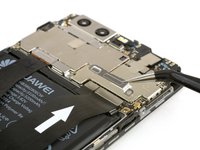
      • Remove the Phillips #00 screw.

      • Use tweezers to remove the metal plate.

      • Use a spudger to disconnect the battery flex cable.

      Chiedi a FixBot

      Aggiungi Commento

    1. Huawei P10 Vibration Motor Replacement, Charging Board: passo 5, immagine 1 di 2 Huawei P10 Vibration Motor Replacement, Charging Board: passo 5, immagine 2 di 2
      Strumento utilizzato in questo passaggio:
      Tweezers
      $4.99
      • Remove the four Phillips #00 screws.

      • Use Tweezers to remove the metal plate.

      Chiedi a FixBot

      Aggiungi Commento

    2. Huawei P10 Vibration Motor Replacement: passo 6, immagine 1 di 2 Huawei P10 Vibration Motor Replacement: passo 6, immagine 2 di 2
      • Use a spudger to disconnect the main flex cable.

      • Use tweezers to disconnect the antenna cable and pull it out of the clamp holding it down to the charging board.

      Chiedi a FixBot

      Aggiungi Commento

    3. Huawei P10 Vibration Motor Replacement: passo 7, immagine 1 di 2 Huawei P10 Vibration Motor Replacement: passo 7, immagine 2 di 2
      • Use a spudger to disconnect the headphone jack and the loudspeaker flex cables.

      Chiedi a FixBot

      Aggiungi Commento

    4. Huawei P10 Vibration Motor Replacement: passo 8, immagine 1 di 2 Huawei P10 Vibration Motor Replacement: passo 8, immagine 2 di 2
      • Do not damage any components sitting on the charging board while removing it.

      • Use a spudger to pry out the charging board.

      • Remove the charging board.

      Chiedi a FixBot

      Aggiungi Commento

    1. Huawei P10 Vibration Motor Replacement, Vibration Motor: passo 9, immagine 1 di 1
      Strumento utilizzato in questo passaggio:
      Tweezers
      $4.99
      • Use tweezers to remove the vibration motor.

      • There is some adhesive underneath the vibration motor and its flex cable. You can use an iOpener to loosen the adhesive and make the removal easier.

      Chiedi a FixBot

      Aggiungi Commento

Conclusione

To reassemble your device, follow these instructions in reverse order. When reassembling your phone apply new adhesive where it is necessary.


Annulla: non ho completato questa guida.

Autore

con

Dominik Schnabelrauch

Membro da: 11/23/16

267.158 Reputazione

682 guide realizzate

Team

iFixit Membro di iFixit

Staff

119 Membri

72.955 guide realizzate

0Commenti sulla guida

Aggiungi Commento

Visualizza statistiche:

Ultime 24 ore: 4

Ultimi 7 giorni: 16

Ultimi 30 giorni: 68

Tutti i Tempi: 1,601