Salta al contenuto principale
Unisciti alla Community delle riparazioni - Crea un account

HP ZBook 15 Hard Drive Disassembly

Solo Prerequisita
Questa è una guida che contiene solo i prerequisiti! Questa guida fa parte di un'altra procedura e non è destinata ad essere utilizzata da sola.

Cosa ti serve

  1. HP ZBook 15 Hard Drive Disassembly, Battery: passo 1, immagine 1 di 2 HP ZBook 15 Hard Drive Disassembly, Battery: passo 1, immagine 2 di 2
    • Flip the laptop over.

    • Slide the lever with the battery symbol beside it firmly until the battery pops out.

    • Remove the battery from the laptop.

    Chiedi a FixBot
  2. HP ZBook 15 Hard Drive Disassembly, Back Cover: passo 2, immagine 1 di 1
    • Slide the right lever firmly to the right.

    • Slide the cover towards yourself to remove it.

    Chiedi a FixBot
  3. HP ZBook 15 Hard Drive Disassembly, HP ZBook 15 Hard Drive Disassembly: passo 3, immagine 1 di 1
    • Unscrew the three captive screws holding the drive in place with a Phillips #0 screwdriver.

    • The screws will remain inside the springs of the hard drive caddy cover.

    Chiedi a FixBot
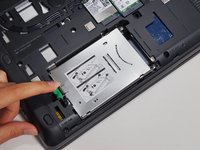
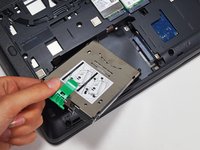
  4. HP ZBook 15 Hard Drive Disassembly: passo 4, immagine 1 di 2 HP ZBook 15 Hard Drive Disassembly: passo 4, immagine 2 di 2
    • Pull the green tab away from the metal casing and lift the drive out.

    Chiedi a FixBot
Conclusione

To reassemble your device, follow these instructions in reverse order.

Grant Terris

Membro da: 01/30/15

2.888 Reputazione

12 guide realizzate

Team

Cal Poly, Team 8-43, Amido Winter 2015 Membro di Cal Poly, Team 8-43, Amido Winter 2015

CPSU-AMIDO-W15S8G43

4 Membri

19 guide realizzate

0Commenti sulla guida

Aggiungi Commento

Visualizza statistiche:

Ultime 24 ore: 1

Ultimi 7 giorni: 6

Ultimi 30 giorni: 46

Tutti i Tempi: 463