Introduzione
This guide covers the replacement of the rear camera glass on the Google Pixel 7. This may be useful for you if your cameras/sensors are still intact, but the glass protecting them is shattered and/or damaged. Replacement glass cut to fit the Pixel 7 can be found for purchase online.
-
-
Using a knife, carefully remove the broken glass covering the camera sensors.
-
After removing all glass, carefully clean the camera lenses with a microfiber cloth. Be cautious of any glass fragments that may remain.
-
-
-
-
Insert the new glass with the adhesive side up (unfortunately, if the adhesive layer faces the camera, the image will be blurry).
-
-
-
Put on a full-surface glass protector. Make sure that no dust collects between the cover and the device/camera glass.
-


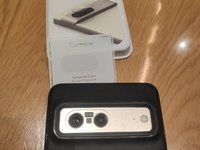
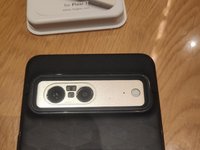

Follow the steps in reverse order to reassemble your device
Annulla: non ho completato questa guida.
Altre 14 persone hanno completato questa guida.
Un ringraziamento speciale a questi traduttori:
100%


Questi traduttori ci stanno aiutando ad aggiustare il mondo! Vuoi partecipare?
Inizia a tradurre ›


10Commenti sulla guida
Moin, könntest du mir nen link zukommen lassen wo du das Kameraglas her hast?
Hi, beide Gläser sind von Amazon, leider ist das untere, passende Glas momentan nicht lieferbar. Zudem habe ich leider feststellen müssen, dass die Klebeschicht die Qualität negativ beeinflusst. Ich versuche aktuell die Schicht zu entfernen, habe aber noch kein geeignetes Mittel gefunden.
I did find a link on Amazon (Canadian one) that had the actual lense. It also states in the ad that it doesn't involve taking apart my phone, just do what you did in a sense. I'll post the link for you to check it out if you can and would like to. I'll update you on how it goes for me.
It is a big issues. I am also facing same problem I can't replace it because in my country there is no pixel store .
So are you saying that I take the oval glass and place it adhesive up (not down, adhering it to the phone) and then cover with a larger rear screen protector, such that the adhesive holds the oval glass to the inside of the larger screen protector?
I have tried replacing the oval glass by itself with the adhesive down to hold the oval glass to the phone without the larger rear screen protector and the lens will not focus on distance items, i.e. appear blurry as you indicate.
