Introduzione
Use this guide to replace a worn out battery for your Gateway GWTC116-2BL laptop. If your computer is shutting down randomly, this may mean you need a new battery. Overheating of your computer means your computer is working too hard. This guide will show you a simplified step-by-step break down to replace your battery. Before starting this replacement guide, be sure to be grounded before handling the battery.
Cosa ti serve
-
-
Remove the ten 3.0 mm Phillips #00 screws from the back panel of the laptop.
-
-


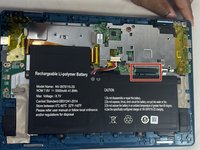
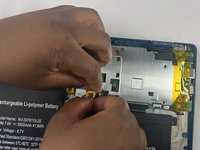

To reassemble your device, follow these instructions in reverse order.
Annulla: non ho completato questa guida.
Altre 2 persone hanno completato questa guida.


Team

UMass Dartmouth, Team 6-2, Botvin Spring 2024 Membro di UMass Dartmouth, Team 6-2, Botvin Spring 2024
UMASSD-BOTVIN-S24S6G2
3 Membri
5 Guide realizzate
