Salta al contenuto principale
Unisciti alla Community delle riparazioni - Crea un account

Fast Fix FOB Battery Replacement

Cosa ti serve

  1. Fast Fix FOB Battery Replacement, Battery: passo 1, immagine 1 di 1
    • Purchase two CR2016 batteries.

    • You can find these at your local drugstore or hardware store.

    Chiedi a FixBot
  2. Fast Fix FOB Battery Replacement: passo 2, immagine 1 di 2 Fast Fix FOB Battery Replacement: passo 2, immagine 2 di 2
    • Use a small and thin object, like a penny or other coin, to pry open the FOB. It will separate into two pieces.

    Chiedi a FixBot
  3. Fast Fix FOB Battery Replacement: passo 3, immagine 1 di 1
    • Identify which part of the FOB holds the battery. You should be able to clearly see the circular batteries in one half.

    • You should be able to clearly see the circular batteries in one half. You will not the need the other part of the FOB until the end.

    Chiedi a FixBot
  4. Fast Fix FOB Battery Replacement: passo 4, immagine 1 di 2 Fast Fix FOB Battery Replacement: passo 4, immagine 2 di 2
    • Remove both batteries from the FOB by releasing them from the prongs.

    Chiedi a FixBot
  5. Fast Fix FOB Battery Replacement: passo 5, immagine 1 di 2 Fast Fix FOB Battery Replacement: passo 5, immagine 2 di 2
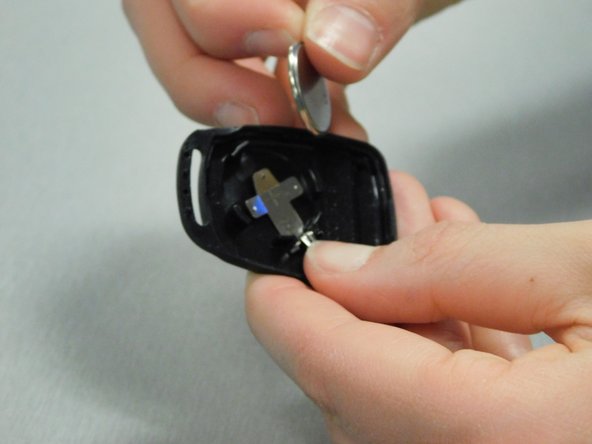
    • Insert the new CR2016 batteries with the positive side facing down, and make sure the batteries are secure under the prongs.

    Chiedi a FixBot
  6. Fast Fix FOB Battery Replacement: passo 6, immagine 1 di 3 Fast Fix FOB Battery Replacement: passo 6, immagine 2 di 3 Fast Fix FOB Battery Replacement: passo 6, immagine 3 di 3
    • Put the FOB back together.

    • You should hear a click that secures the two pieces in place.

    Chiedi a FixBot
Linea Traguardo

Un'altra persona ha completato questa guida.

0Commenti sulla guida

Aggiungi Commento

Visualizza statistiche:

Ultime 24 ore: 0

Ultimi 7 giorni: 11

Ultimi 30 giorni: 60

Tutti i Tempi: 979