Salta al contenuto principale

Dell AC511 Front Panel Replacement

Cosa ti serve

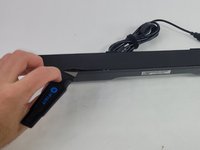
  1. Dell AC511 Front Panel Replacement, Front Panel: passo 1, immagine 1 di 3 Dell AC511 Front Panel Replacement, Front Panel: passo 1, immagine 2 di 3 Dell AC511 Front Panel Replacement, Front Panel: passo 1, immagine 3 di 3
    • Use a Jimmy to peel off the screen stuck to the front of the speaker.

    • Start from any corner and use the Jimmy to get under the screen. Once one side lifts up, you can use your fingers to peel the rest off.

    • Be careful to avoid damage to the rest of the speaker and especially to yourself.

    • Don't worry if it tears; use the Jimmy again to peel off the rest.

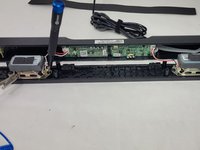
  2. Dell AC511 Front Panel Replacement: passo 2, immagine 1 di 2 Dell AC511 Front Panel Replacement: passo 2, immagine 2 di 2
    • Remove ten 6 mm screws using a Phillips #1 screwdriver.

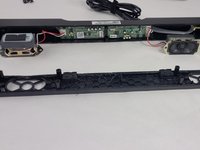
  3. Dell AC511 Front Panel Replacement: passo 3, immagine 1 di 2 Dell AC511 Front Panel Replacement: passo 3, immagine 2 di 2
    • Lift the front panel off of the rest of the device.

    • The speakers will still be attached to the front panel. Being too rough could damage them.

    • Remove the 4 mm screws from the speakers using a JIS #1 screwdriver.

    • Remove the front panel from the device.

Conclusione

To reassemble your device, follow these instructions in reverse order.

Un'altra persona ha completato questa guida.

William Cook

Membro da: 03/19/24

653 Reputazione

6 Guide realizzate

Team

0Commenti sulla guida

Aggiungi Commento

Visualizza Statistiche:

Ultime 24 Ore: 1

Ultimi 7 Giorni: 10

Ultimi 30 Giorni: 48

Tutti i Tempi: 900