Salta al contenuto principale
Unisciti alla Community delle riparazioni - Crea un account

Connect Four Electronic Handheld Speaker Replacement

Visualizzazioni: 763

Visualizza statistiche:

Ultime 24 ore:
2
Ultimi 7 giorni:
22
Ultimi 30 giorni:
97
Tutti i Tempi:
763
Commenti: 0

Nessuno ha lasciato commenti su questa guida. Sarai il primo?

Vai ai commenti della guida
Completato: 1

1 persona ha contrassegnato questa guida come "completata". Sarai il prossimo?

Preferiti: 0

Nessuno ha preferito (e si è iscritto) questa guida. Sarai il primo?

Tempo necessario: 10 minuti
Difficoltà: Moderato
Connect Four Electronic Handheld Speaker Replacement

Introduzione

Vai al passo 1 ↓

If your Connect Four Electronic Handheld does not make any sound, you may need to replace the speaker. This replacement guide will show you how to remove the back casing and remove the speaker. In addition, this guide will also show you how to re-solder the speaker wires.

Cosa ti serve

Ricambi

Strumenti

    1. Connect Four Electronic Handheld Speaker Replacement, Ensure the device is off.: passo 1, immagine 1 di 1
      • Make sure the Connect Four Electronic Handheld is off by allowing it to shut off automatically.

      Chiedi a FixBot

      Aggiungi Commento

    2. Connect Four Electronic Handheld Speaker Replacement, Removing the battery casing.: passo 2, immagine 1 di 2 Connect Four Electronic Handheld Speaker Replacement, Removing the battery casing.: passo 2, immagine 2 di 2
      • Using a Phillips head screwdriver, remove the (9.1mm length) #2 screw in the middle of the battery casing.

      • Slide the cover off and remove the battery.

      Chiedi a FixBot

      Aggiungi Commento

    1. Connect Four Electronic Handheld Speaker Replacement, Removing/Replacing the Back Casing: passo 3, immagine 1 di 2 Connect Four Electronic Handheld Speaker Replacement, Removing/Replacing the Back Casing: passo 3, immagine 2 di 2
      • Using a Phillips head screwdriver, remove the four (7.1mm- length) #3 screws that hold the back casing in place.

      • Carefully remove the back casing.

      • When removing the back casing, make sure not to rupture the wires that connect the speaker to the circuit board.

      Chiedi a FixBot

      Aggiungi Commento

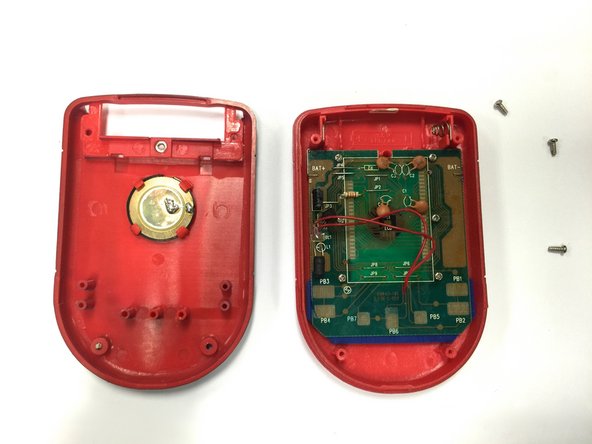
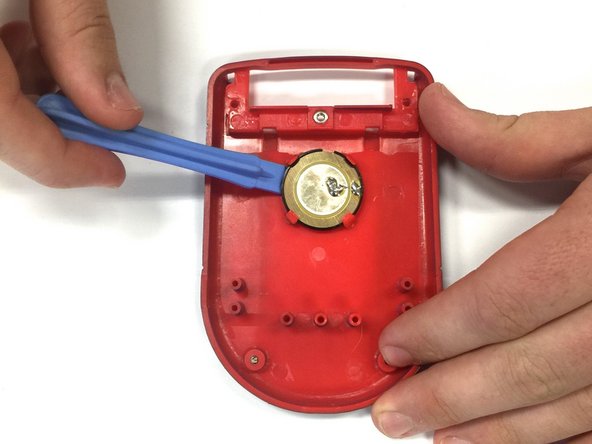
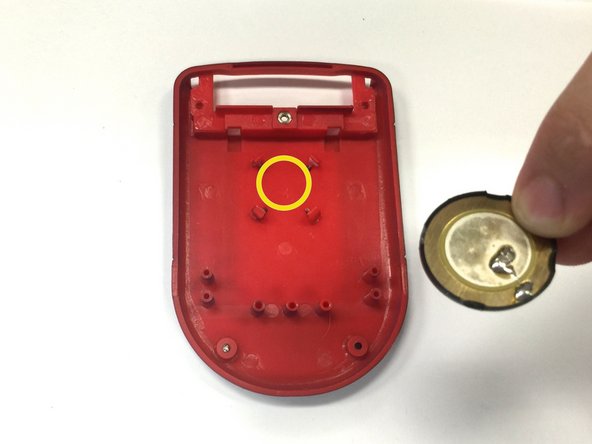
    1. Connect Four Electronic Handheld Speaker Replacement, Replacing the speaker: passo 4, immagine 1 di 3 Connect Four Electronic Handheld Speaker Replacement, Replacing the speaker: passo 4, immagine 2 di 3 Connect Four Electronic Handheld Speaker Replacement, Replacing the speaker: passo 4, immagine 3 di 3
      • If the speaker is in working condition, but the wires are broken or disconnected, skip this step and move on to step 5.

      • Locate the speaker on the back casing.

      • Using a spudger, wedge the speaker out of its place until it slides out.

      • Take the replacement speaker and wedge it back into its space.

      Chiedi a FixBot

      Aggiungi Commento

    2. Connect Four Electronic Handheld Speaker Replacement, Re-Soldering the Speaker Wire: passo 5, immagine 1 di 1
      • Using a soldering iron, solder both red wires to their appropriate connections.

      • Be extremely careful when using a soldering iron! Contact with the tip could cause severe burns.

      Chiedi a FixBot

      Aggiungi Commento

Conclusione

To reassemble your device, follow these instructions in reverse order.

Annulla: non ho completato questa guida.

Un'altra persona ha completato questa guida.

Wil

Membro da: 10/22/14

313 Reputazione

3 guide realizzate

Team

Baylor, Team 8-11, Williams Fall 2014 Membro di Baylor, Team 8-11, Williams Fall 2014

BU-WILLIAMS-F14S8G11

3 Membri

72 guide realizzate

0Commenti sulla guida

Aggiungi Commento

Visualizza statistiche:

Ultime 24 ore: 2

Ultimi 7 giorni: 22

Ultimi 30 giorni: 97

Tutti i Tempi: 763