Salta al contenuto principale

Celestron HomeCast Lite 47020 Button Replacement

Cosa ti serve

  1. Celestron HomeCast Lite 47020 Button Replacement, Button: passo 1, immagine 1 di 3 Celestron HomeCast Lite 47020 Button Replacement, Button: passo 1, immagine 2 di 3 Celestron HomeCast Lite 47020 Button Replacement, Button: passo 1, immagine 3 di 3
    • Find the device's back panel.

    • Using the screwdriver, remove the four screws and open the back panel.

  2. Celestron HomeCast Lite 47020 Button Replacement: passo 2, immagine 1 di 2 Celestron HomeCast Lite 47020 Button Replacement: passo 2, immagine 2 di 2
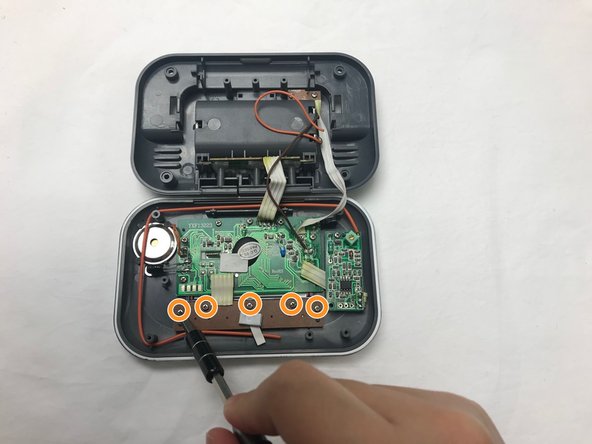
    • Locate the brown rectangular control board.

    • Using the screwdriver, remove the five screws from the brown board.

  3. Celestron HomeCast Lite 47020 Button Replacement: passo 3, immagine 1 di 3 Celestron HomeCast Lite 47020 Button Replacement: passo 3, immagine 2 di 3 Celestron HomeCast Lite 47020 Button Replacement: passo 3, immagine 3 di 3
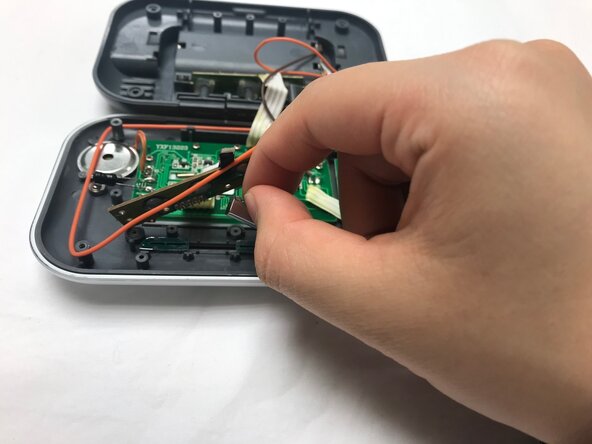
    • Carefully remove the brown board to reveal the buttons.

    • Remove the buttons and replace with new buttons.

Conclusione

To reassemble your device, follow these instructions in reverse order.

xin zhao

Membro da: 02/04/19

243 Reputazione

2 Guide realizzate

Team

UC Davis, Team S18-G7, Lore Winter 2019 Membro di UC Davis, Team S18-G7, Lore Winter 2019

UCD-LORE-W19S18G7

4 Membri

3 Guide realizzate

0Commenti sulla guida

Aggiungi Commento

Visualizza Statistiche:

Ultime 24 Ore: 0

Ultimi 7 Giorni: 0

Ultimi 30 Giorni: 2

Tutti i Tempi: 175