Salta al contenuto principale

Brother MFC-J4420DW Power supply replacement

  1. Brother MFC-J4420DW Power supply replacement, Removing hood holder: passo 1, immagine 1 di 3 Brother MFC-J4420DW Power supply replacement, Removing hood holder: passo 1, immagine 2 di 3 Brother MFC-J4420DW Power supply replacement, Removing hood holder: passo 1, immagine 3 di 3
    • Disconnect the power cord of the printer

    • Open the printer as you would to access the USB port.

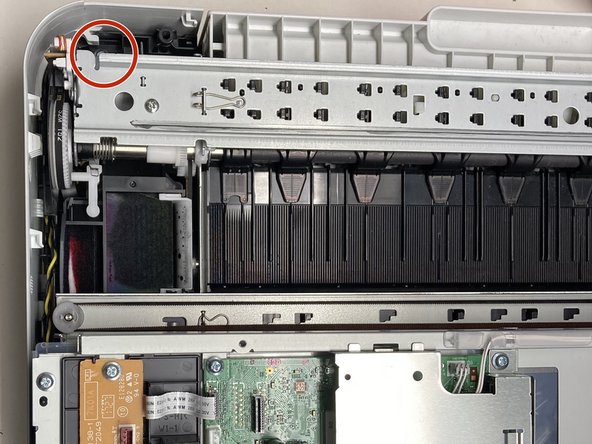
    • Pull out the rear end of the hood holder (see picture two). After that you can remove the top part of the hood holder.

    • Now remove the hood holder completely.

    • It is quite useful to put the printer near something so that you can lean the top against something, for example a wall.

  2. Brother MFC-J4420DW Power supply replacement, Removing cables connected to the top part of the printer: passo 2, immagine 1 di 3 Brother MFC-J4420DW Power supply replacement, Removing cables connected to the top part of the printer: passo 2, immagine 2 di 3 Brother MFC-J4420DW Power supply replacement, Removing cables connected to the top part of the printer: passo 2, immagine 3 di 3
    • Next remove the cover on the left side of the printer (lift the right side of the cover first).

    • Unplug the black ribbon cable, the blue and the white plugs from its sockets and unscrew the cable which is attached with a screw (see second image)

    • Remove the red and white plugs from its sockets as shown in picture three.

  3. Brother MFC-J4420DW Power supply replacement, Remove the top part of the printer: passo 3, immagine 1 di 3 Brother MFC-J4420DW Power supply replacement, Remove the top part of the printer: passo 3, immagine 2 di 3 Brother MFC-J4420DW Power supply replacement, Remove the top part of the printer: passo 3, immagine 3 di 3
    • Flip the plastic part shown in picture one up to the top part of the printer

    • Now you can easily remove the top of the printer by pushing it away from the printer (not up).

  4. Brother MFC-J4420DW Power supply replacement, Remove cover: passo 4, immagine 1 di 2 Brother MFC-J4420DW Power supply replacement, Remove cover: passo 4, immagine 2 di 2
    • Remove the screws connecting the black plastic cover to the printer (see image)

    • Remove the cover

    • The following steps are based on the Brother Inkjet DCP/MFC Service Manual MODELS: DCP-J4120DW MFC-J4320DW/J4420DW MFC-J4520DW MFC-J4620DW/J4625DW. In particular, step 9.29 “Power Supply PCB ASSY”.

  5. Brother MFC-J4420DW Power supply replacement, Disconnect the cable: passo 6, immagine 1 di 1
    • Remove the connector with the many red cables. (Already removed in the picture. The other plugs do not need to be removed.)

  6. Brother MFC-J4420DW Power supply replacement, Remove screws: passo 7, immagine 1 di 2 Brother MFC-J4420DW Power supply replacement, Remove screws: passo 7, immagine 2 di 2
    • There are two screws that need to be removed.

  7. Brother MFC-J4420DW Power supply replacement, Remove the power supply unit: passo 8, immagine 1 di 1
    • Release the clip so that the power supply unit can be removed downwards.

  8. Brother MFC-J4420DW Power supply replacement, Power supply: passo 9, immagine 1 di 1
    • This is what the power supply looks like.

    • It is labeled B57U152-2 LF1

    • A possible starting point here is the soldered fuse F1. According to the circuit board, “250V T2.5AH”.

    • However, the fuse may only be a symptom and not the cause. See for example the article https://www.mikrocontroller.net/topic/50...

Conclusione

Follow the steps in reverse order to reassemble your device.

Altre 2 persone hanno completato questa guida.

Un ringraziamento speciale a questi traduttori:

de en

100%

oldturkey03 ci sta aiutando ad aggiustare il mondo! Vuoi partecipare?
Inizia a tradurre ›

FeLa

Membro da: 09/26/24

175 Reputazione

1 Guida realizzata

1Commento della guida

Hi,

Top Anleitung , bei mir ist der Mosfet durchgebrannt , mal schauen was ich jetzt mache

Wilhelm - Replica

Aggiungi Commento

Visualizza Statistiche:

Ultime 24 Ore: 7

Ultimi 7 Giorni: 56

Ultimi 30 Giorni: 205

Tutti i Tempi: 2,676