Salta al contenuto principale
Unisciti alla Community delle riparazioni - Crea un account

Bose SoundLink Color Button Pad Replacement

Visualizzazioni: 11.909

Visualizza statistiche:

Ultime 24 ore:
3
Ultimi 7 giorni:
33
Ultimi 30 giorni:
128
Tutti i Tempi:
11.909
Commenti: 48

45 commenti sui passaggi, 3 commenti sulla guida.

Vai ai commenti della guida
Completato: 8

8 persone hanno contrassegnato questa guida come "completata". Sarai il prossimo?

Preferiti: 0

Nessuno ha preferito (e si è iscritto) questa guida. Sarai il primo?

Tempo necessario: 30 minuti
Difficoltà: Difficile
Bose SoundLink Color  Button Pad Replacement

Introduzione

Vai al passo 1 ↓

When one or all of the buttons stop working on a device, it can be a frightening thing. Use this guide to help.

Cosa ti serve

Ricambi

Strumenti

    1. Bose SoundLink Color  Button Pad Replacement, Outer Casing: passo 1, immagine 1 di 2 Bose SoundLink Color  Button Pad Replacement, Outer Casing: passo 1, immagine 2 di 2
      • Four round, plastic plugs are located on the back of the device.

      • Using a metal spudger, carefully pry up the plastic covers.

      • The covers are all glued on, so be careful not to scar the casing when prying them off. If possible, use a spudger or plastic opening tool to remove them.

      Chiedi a FixBot

      Aggiungi Commento

    2. Bose SoundLink Color  Button Pad Replacement: passo 2, immagine 1 di 2 Bose SoundLink Color  Button Pad Replacement: passo 2, immagine 2 di 2
      • Remove the four 1.8 cm-long T15 Torx Security screws from the outer case.

      • Some of these use T15 "Star" 5-point Torx security screws instead of the more common 6-point ones.

      Chiedi a FixBot

      Aggiungi Commento

    3. Bose SoundLink Color  Button Pad Replacement: passo 3, immagine 1 di 2 Bose SoundLink Color  Button Pad Replacement: passo 3, immagine 2 di 2
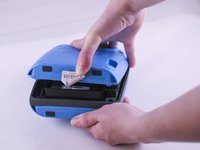
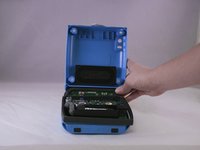
      • Carefully open up the casing.

      • The top button pad may need to be re-glued upon installing the new casing.

      Chiedi a FixBot

      Aggiungi Commento

    1. Bose SoundLink Color  Button Pad Replacement, Button Pad: passo 4, immagine 1 di 2 Bose SoundLink Color  Button Pad Replacement, Button Pad: passo 4, immagine 2 di 2
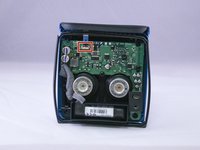
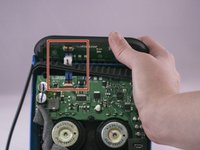
      • Lift up the retaining flap on the button cable ZIF connector.

      • Pull the button cable straight out of the connector.

      Chiedi a FixBot

      Aggiungi Commento

    2. Bose SoundLink Color  Button Pad Replacement: passo 5, immagine 1 di 2 Bose SoundLink Color  Button Pad Replacement: passo 5, immagine 2 di 2
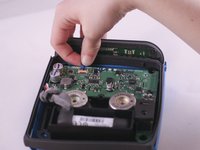
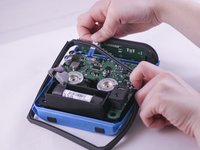
      • Carefully pull the ribbon cable through the rubber gasket that runs around the device.

      Chiedi a FixBot

      Aggiungi Commento

    3. Bose SoundLink Color  Button Pad Replacement: passo 6, immagine 1 di 1
      • To remove the old rubber button pad, carefully peel it off of the blue casing.

      Chiedi a FixBot

      Aggiungi Commento

Conclusione

To reassemble your device, follow these instructions in reverse order, starting from Step 6.

Annulla: non ho completato questa guida.

Altre 8 persone hanno completato questa guida.

Autore

con

Michael Thorn

Membro da: 03/31/16

557 Reputazione

3 guide realizzate

3Commenti sulla guida

Great guide, and I think I can manage this. But, where can I get the Replacement Bose SoundLink Color Button Pad??

Fred

Fred Fish - Rispondi Condividi

I’m wondering the same thing. Where do you get the replacement Bose Soundlink Color button pad? We just bought a new charger because we thought that was the problem. But that didn’t make any difference. We still can’t turn the speaker on!

Lynn Wilson - Rispondi Condividi

I got the bose soundlink color button panel only with bose India authorised service center in South Mumbai . That cost me in Indian RS. 2360. Including approx $35 USD.

nrirehan - Rispondi Condividi

Aggiungi Commento

Visualizza statistiche:

Ultime 24 ore: 3

Ultimi 7 giorni: 33

Ultimi 30 giorni: 128

Tutti i Tempi: 11,909