Salta al contenuto principale

Asus X515 SSD Replacement

  1. Asus X515 SSD Replacement, Flip over laptop: passo 1, immagine 1 di 2 Asus X515 SSD Replacement, Flip over laptop: passo 1, immagine 2 di 2
    • Power down the laptop and unplug all of the cables.

    • Flip over the laptop.

  2. Asus X515 SSD Replacement, Take off bottom cover: passo 2, immagine 1 di 2 Asus X515 SSD Replacement, Take off bottom cover: passo 2, immagine 2 di 2
    • Remove the 10 phillips screws from the bottom of the case.

    • Using a prying tool pry the bottom of the case open.

  3. Asus X515 SSD Replacement, Disconnect battery: passo 3, immagine 1 di 3 Asus X515 SSD Replacement, Disconnect battery: passo 3, immagine 2 di 3 Asus X515 SSD Replacement, Disconnect battery: passo 3, immagine 3 di 3
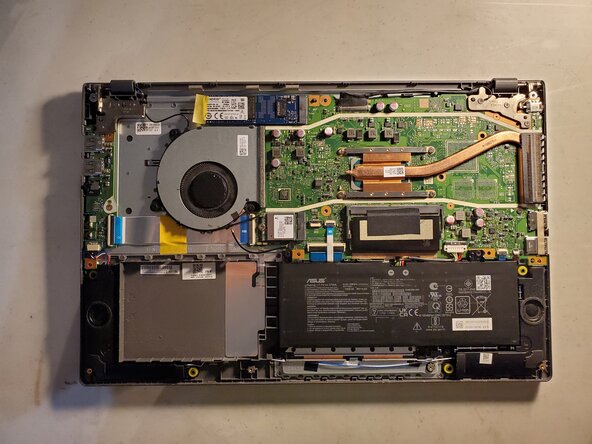
    • Locate the battery and its connector.

    • Using your fingers or a prying tool pull up on the connector to disconnect it.

  4. Asus X515 SSD Replacement, Remove the SSD: passo 4, immagine 1 di 3 Asus X515 SSD Replacement, Remove the SSD: passo 4, immagine 2 di 3 Asus X515 SSD Replacement, Remove the SSD: passo 4, immagine 3 di 3
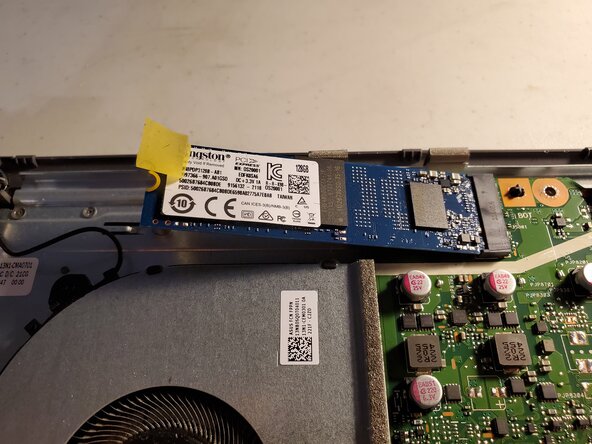
    • Locate the SSD

    • Peel the tape so that you can access the screw.

    • Remove the single screw.

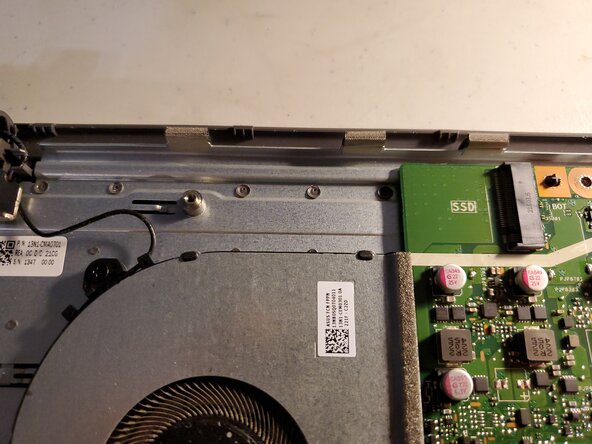
    • The SSD will pop up and face outwards.

    • Pull the SSD outwards.

Conclusione

To reassemble your device, follow these instructions in reverse order.

Jeremiah C.

Membro da: 03/28/22

700 Reputazione

6 Guide realizzate

0Commenti sulla guida

Aggiungi Commento

Visualizza Statistiche:

Ultime 24 Ore: 5

Ultimi 7 Giorni: 21

Ultimi 30 Giorni: 92

Tutti i Tempi: 595