Salta al contenuto principale
Unisciti alla Community delle riparazioni - Crea un account

Altec Lansing Mini Lifejacket 2 Battery Replacement

Cosa ti serve

  1. Altec Lansing Mini Lifejacket 2 Battery Replacement, Back Panel: passo 1, immagine 1 di 3 Altec Lansing Mini Lifejacket 2 Battery Replacement, Back Panel: passo 1, immagine 2 di 3 Altec Lansing Mini Lifejacket 2 Battery Replacement, Back Panel: passo 1, immagine 3 di 3
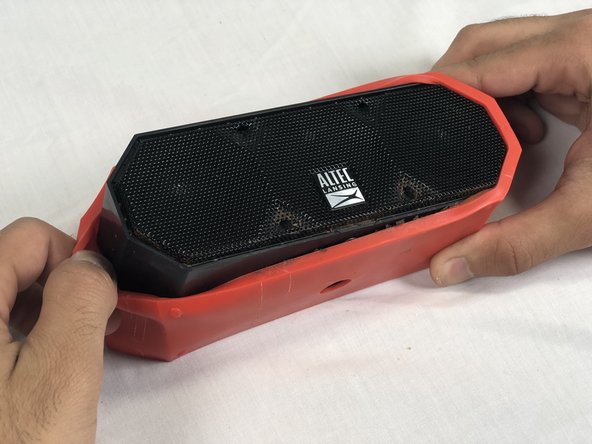
    • Use the spudger to remove the eight black pins from the front and back of the wire screens.

    Chiedi a FixBot

    Aggiungi Commento

  2. Altec Lansing Mini Lifejacket 2 Battery Replacement: passo 2, immagine 1 di 3 Altec Lansing Mini Lifejacket 2 Battery Replacement: passo 2, immagine 2 di 3 Altec Lansing Mini Lifejacket 2 Battery Replacement: passo 2, immagine 3 di 3
    • Detach the eight secondary pins from the front and back of the wire mesh plates with a spudger.

    • Removing the secondary pins from the rubber casing is optional.

    Chiedi a FixBot

    Aggiungi Commento

  3. Altec Lansing Mini Lifejacket 2 Battery Replacement: passo 3, immagine 1 di 2 Altec Lansing Mini Lifejacket 2 Battery Replacement: passo 3, immagine 2 di 2
    • Remove both black and orange layers from the speaker body.

    Chiedi a FixBot

    Aggiungi Commento

  4. Altec Lansing Mini Lifejacket 2 Battery Replacement: passo 4, immagine 1 di 3 Altec Lansing Mini Lifejacket 2 Battery Replacement: passo 4, immagine 2 di 3 Altec Lansing Mini Lifejacket 2 Battery Replacement: passo 4, immagine 3 di 3
    • Remove the single 7.8mm Phillips #2 screw from the mounting plate located under the device.

    • Slide the mounting plate out to remove it.

    Chiedi a FixBot

    Aggiungi Commento

  5. Altec Lansing Mini Lifejacket 2 Battery Replacement: passo 5, immagine 1 di 2 Altec Lansing Mini Lifejacket 2 Battery Replacement: passo 5, immagine 2 di 2
    • Pry off the wire mesh on both sides using a metal spudger.

    • Be gentle to avoid bending the mesh.

    Chiedi a FixBot

    Aggiungi Commento

  6. Altec Lansing Mini Lifejacket 2 Battery Replacement: passo 6, immagine 1 di 2 Altec Lansing Mini Lifejacket 2 Battery Replacement: passo 6, immagine 2 di 2
    Strumento utilizzato in questo passaggio:
    Tweezers
    $4.99
    • Using tweezers, remove the four rubber stoppers in each corner of the rear panel.

    Chiedi a FixBot

    Aggiungi Commento

  7. Altec Lansing Mini Lifejacket 2 Battery Replacement: passo 7, immagine 1 di 1
    • Remove the four 13.7mm Phillips #1 screws located underneath the rubber stoppers.

    Chiedi a FixBot

    Aggiungi Commento

  8. Altec Lansing Mini Lifejacket 2 Battery Replacement: passo 8, immagine 1 di 1
    • Pull the case apart to access the interior components.

    Chiedi a FixBot

    Aggiungi Commento

  9. Altec Lansing Mini Lifejacket 2 Battery Replacement: passo 9, immagine 1 di 3 Altec Lansing Mini Lifejacket 2 Battery Replacement: passo 9, immagine 2 di 3 Altec Lansing Mini Lifejacket 2 Battery Replacement: passo 9, immagine 3 di 3
    • To remove the back panel, gently pull out its wire harness.

    Chiedi a FixBot

    Aggiungi Commento

  10. Altec Lansing Mini Lifejacket 2 Battery Replacement, Battery: passo 10, immagine 1 di 3 Altec Lansing Mini Lifejacket 2 Battery Replacement, Battery: passo 10, immagine 2 di 3 Altec Lansing Mini Lifejacket 2 Battery Replacement, Battery: passo 10, immagine 3 di 3
    • Disconnect the battery from the motherboard.

    • The battery is not secured within the case and can be removed after detaching its wiring from the circuit board.

    Chiedi a FixBot

    Aggiungi Commento

Conclusione

To reassemble your device, follow these instructions in reverse order.

Annulla: non ho completato questa guida.

Altre 8 persone hanno completato questa guida.

Team

USF Tampa, Team S3-G2, Nance Spring 2018 Membro di USF Tampa, Team S3-G2, Nance Spring 2018

USFT-NANCE-S18S3G2

4 Membri

4 guide realizzate

13Commenti sulla guida

Where can you get the batteries? Altec Lansing doesn’t carry them.

alanp5 - Rispondi Condividi

Search for MCR18650 battery. They are available.

F Hickisch - Rispondi Condividi

Hickisch, I appreciate your guide on replacing this battery, but I beg to differ that replacement batteries are “available.” I keep getting sent batteries with 3-wire connectors instead of 2-wire. Plz send me a link, plz. Gracias.

rudy.ch.garcia - Rispondi Condividi

Sounds like you need to find another source instead of aliexpress or ebay. Digikey has them with the correct 2 wire connection. It's just a standard 18650 battery with the wires spot welded to the positive and negative terminals. Anything with a 3rd wire is likely meant as a charge sensing wire for a batter that has on board circuitry.

rchuncleskeleton - Rispondi Condividi

for the mini life jacket 3, the motherboard is upside down so you need to remove it to unplug the battery.

Edgar Corral (Tramarius) - Rispondi Condividi

Aggiungi Commento

Visualizza statistiche:

Ultime 24 ore: 1

Ultimi 7 giorni: 14

Ultimi 30 giorni: 139

Tutti i Tempi: 24,312