Salta al contenuto principale
Unisciti alla Community delle riparazioni - Crea un account

Altec Lansing BoomJacket Bluetooth Board Replacement

Cosa ti serve

  1. Altec Lansing BoomJacket Bluetooth Board Replacement, Case Removal: passo 1, immagine 1 di 1
    • Using your hands, remove the pegs (4+4) from the front and back of the speaker.

    Chiedi a FixBot

    Aggiungi Commento

  2. Altec Lansing BoomJacket Bluetooth Board Replacement: passo 2, immagine 1 di 1
    • Remove the outer black rubber housing of the speaker.

    Chiedi a FixBot

    Aggiungi Commento

  3. Altec Lansing BoomJacket Bluetooth Board Replacement: passo 3, immagine 1 di 1
    • Remove the inner blue rubber housing from the speaker.

    Chiedi a FixBot

    Aggiungi Commento

  4. Altec Lansing BoomJacket Bluetooth Board Replacement: passo 4, immagine 1 di 1
    • Pull out the two black wire meshes using a metal spudger.

    • Be careful not to damage the metal casing.

    Chiedi a FixBot

    Aggiungi Commento

  5. Altec Lansing BoomJacket Bluetooth Board Replacement: passo 5, immagine 1 di 2 Altec Lansing BoomJacket Bluetooth Board Replacement: passo 5, immagine 2 di 2
    Strumento utilizzato in questo passaggio:
    Tweezers
    $4.99
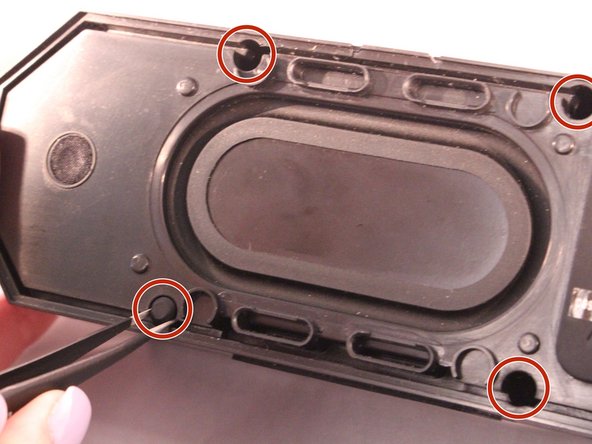
    • Using tweezers remove the rubber stoppers (4 at the back + 2 at the front).

    Chiedi a FixBot

    Aggiungi Commento

  6. Altec Lansing BoomJacket Bluetooth Board Replacement: passo 6, immagine 1 di 1
    • Using the size PH1 screwdriver remove the screws exposed from the rubber stoppers (4 + 2).

    Chiedi a FixBot

    Aggiungi Commento

  7. Altec Lansing BoomJacket Bluetooth Board Replacement: passo 7, immagine 1 di 1
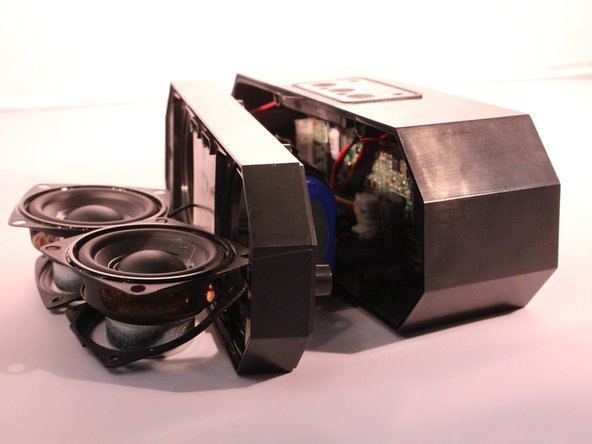
    • Pull the case apart and you will be able to see all the components inside the speaker.

    Chiedi a FixBot

    Aggiungi Commento

  8. Altec Lansing BoomJacket Bluetooth Board Replacement, Bluetooth Board: passo 8, immagine 1 di 1
    • Now that the case is open look for the small green (NFC) chip on the inside of the case next to the motherboard.

    Chiedi a FixBot

    Aggiungi Commento

  9. Altec Lansing BoomJacket Bluetooth Board Replacement: passo 9, immagine 1 di 1
    • Disconnect the Bluetooth (NFC) chip from the motherboard.

    Chiedi a FixBot

    Aggiungi Commento

Conclusione

To reassemble your device, follow these instructions in reverse order.

Annulla: non ho completato questa guida.

Altre 2 persone hanno completato questa guida.

1Commento della guida

Is this a common issue with the Lifejacket 3? I was able to use my new BT speaker twice, since it was bought last week. The speaker hasn't been dropped, in or around water, outside, left on, damaged, or tampered with.

Kat - Rispondi Condividi

Aggiungi Commento

Visualizza statistiche:

Ultime 24 ore: 2

Ultimi 7 giorni: 3

Ultimi 30 giorni: 31

Tutti i Tempi: 5,100